Showing posts with label C1. Show all posts

Wednesday, December 24, 2014

Parsing the Creatures 1 Graveyard file

 
One more victim of my file format reversing spree : the "The Graveyard" file containing all entries of C1 cemetery.


Parsing it will allow us to retrieve/edit/add all entries from this game file.

Sunday, December 14, 2014

Extracting information from Creatures 1 PhotoAlbum files (And uncovering a 20 years old 2 pixel bug :)

In the last article, we've seen how to manually use the "dde: pict" CAOS command to take picture of our Norns the way the Owner's kit does it.

When doing it the usual way through the Owner's kit, all pictures are saved in individual photo album files for each Norn.
In this article I will show you all you need to know to extract all information from those file : timestamps, comments, and obviously, the picture data.


Saturday, December 13, 2014

Repairing and understanding the lost "dde: pict" command (Taking photos of C1 Norns)


One promising nugget in the Creatures 1 CAOS reference, is the "dde: pict" command.

According to the documentation,


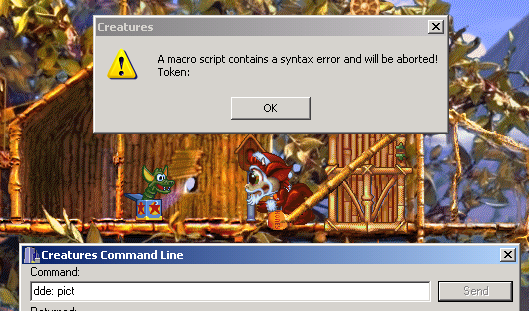
 Unfortunately, as many other things this command not only lacks critical bits of explanation but is also inherently broken (at least considering the above definition) and when used produces less than stellar results:


It's a shame we can't use this functionality in our own tools to take pictures as the Owner's kit does.
Or can't we ?

One of the main motives behind the site being uncovering such lost knowledge and abilities of the ancient Shee, come with me and find out how to understand and ultimately take advantage of this lost command.

Sunday, November 30, 2014

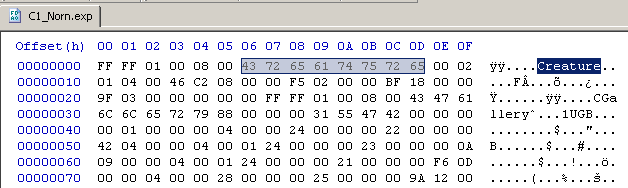
Reversing the C1 .exp file format part 1 (General layout and extracting the genome)

It's been all those years, and despite a lot of talented persons having contributed to making Creatures tools or documenting the game various features, there still isn't any available description of the .exp file formant anywhere as we're nearing 2015.


The .exp files are the format in which creatures are exported or imported from and to the game.

Obviously, they contain about anything one could need to know about a given Norn, and exploiting them for writing custom tools might allow for a lot of interesting options such as exporting a critically ill norn, performing offline surgery on the file, and reimporting it into the game.

This would allow curing a couple otherwise fatal issues since the ingame mechanics don't provide any means of removing a given chemical from a creature bloodstream or reinvigorating degraded C2 organs.
(See the case of C2 grendels being oversensitive to cyanide poisoning because they lack the chemical reaction genes that would allow them to lower their cyanide levels)

In this series of articles, I will describe the process of reverse engineering the C1 (and later C2) .exp file format so any programmer out there can use the information to implement .exp file manipulating programs.

The first articles of the series will show the process followed so more people can learn "how it's done" and maybe later take on reversing other undocumented game file formats.
Hopefully, if enough information can be gathered about the format, a final article will sum everything up into the cleanest and most complete description possible.

For this first article, we will analyse the general file layout, and learn how to extract a working genome file from an .exp file.

Let's dive into binary DNA !

Saturday, November 29, 2014

Parsing Creatures 1 .spr files (Extracting/Manipulating any of the game's graphics)

In a previous article I showed how to read Creatures 2 .s16 files to extract any of the game image data.
In this obvious follow up I will show you how to read out Creatures 1.spr files for the same result.

The Creatures 1 .spr file format is only marginally harder to parse than the .s16 format.
This is because the .spr files do not directly contain color information for each pixel, but rather an index number, to be used as a lookup index inside an external palette file to get the actual color data.
 
Thankfully, Python magic can once again save us most of the hard work and makes extracting an manipulating C1 images files a breeze.


Saturday, February 15, 2014

Connecting to the Creatures DDE interface from python

We've recently seen how easy it is to connect to the C1 and C2 DDE interfaces using VB.

This time we will show how easy it is to connect to those interfaces using python, which will prove useful in upcoming articles.


Connecting to a DDE server from inside python is can be a quick and easy process.
The hardest part is in acquiring the correct modules to do so, (which can be a real pain if you take it from the wrong side), there are also a couple specifics that make debugging the first DDE connections unreliable.
Fortunately I've sorted those perks out for you,and will show you the single quickest and easy way to connect to the Creatures 1 and 2 DDE interface from python.


Thursday, January 30, 2014

Investigating C1 climate (for a huge fail)


We all now C2 has an complex ecology model, where temperature,wind light, radiation and others such parameters dynamically shape the worlds face.

But did you know that basic ecology elements are also present in C1 to some extent?
Let's find out about those together.


Monday, January 20, 2014

Designing farting norns (Tutorial)


Many colored alternative breeds exist for all of the creatures games.

In this tutorial I will show you how to design a new breed for C1.
But not one that involves making new sprites for new colored or punk Norns, but rather one that implements new Norn behaviours and possibilities.
Using those techniques one could add loads of interesting behaviours to Norns such as :
  • Adding a kicking stance and associated behaviours to fight off Grendel more efficiently
  • Making Norns that can reinvigorate and heal by resorting to meditation
  • Enabling actual telekinesis in Norns ( yes, this IS possible with some work )
  • Making jumping Norns
  • Mimicking more realistic life behaviour ( digestion, elimination ... )
  • ...
But this time we will be:

Making Farting Norns:

Friday, January 17, 2014

Norns caesarean (saving the egg from a dead pregnant Norn)

I read a post today on (the awesome) Discover Albia blog and got slightly depressed by a random statement about the grief of loosing a pregnant Norn along with her egg.

Not that it happened that much to me, maybe once at worst.Yet this was the wake up call I needed to be ready should this ever happen.
So here's some CAOS black magic that will help you saving the egg from a pregnant Norn that passed away before getting to term.

Wednesday, January 15, 2014

Generating arbitray In-game eggs from CAOS commands, while also investigating the Norn reproductive system.


Okay, so in a previous article we've seen how to generate .egg files from genomes with a custom tool.
Even if it may be a nice skill to add to your toolbox, it might not be the most practical everyday tool to inject genomes in your game.

Wouldn't it be more practical if we could directly create ingame eggs from arbitrary genomes/couples as if they were just laid ? This is not only possible but also quite easy.

Some available tools such as the Genome injector on the awesome CDR website already perform that feat. ( Be sure to check out the whole site, as it is definitely the single most complete and comprehensive resource on writing C1 and C2 custom programs )

From there we could go the easy way, as Chris conveniently included a detailed description of the CAOS magic involved in spawning C2 eggs from genomes in the readme file the genome injector ( thanks for that Chris ! ).

But I'll rather show you how you're supposed do find out that information by yourself when starting from scratch, as it will serve us better in the long run when investigating other undocumented game features.
We will be doing this for C1, as Chris' tool only seems to work on Creatures 2.

We will use the CAOS language,it's documentation and some external tools to try to understand what exactly happens during the whole Norn reproductive process, so we can mimic it with a custom and more practical tool.

Saturday, January 11, 2014

The Creatures 1 chemicals.txt file format.

For some odd reason, one of the most commonly usable file in the Creatures series, the Chemicals.txt file,  format is still totally undocumented in 2014.

Maybe somebody did document it and his work was lost in time ? Maybe I'm stupid and this is considered such common knowledge that nobody ever thought writing about it would be worth it ?
Anyway, I take the opportunity to publish the information here so nobody has to find it out by himself again if ever needed.

The Chemicals.txt file contains the list of all chemicals in game, their associated name, as well as their description (as used in the genetics kit)
It's a valuable resource when writing your own programs for dynamically establishing the various chemicals names without worrying about the various countries variations, or custom chemicals installed by various players.

26/01/2014 Update: Seems I've committed a small mistake (sorry, but I'm mostly writing all of that as I do it, so some things might need tuning afterwards)
Although The Chemicals.txt holds chemical description data, it's the chemicals.str file that holds the current actively used ingame chemicals list.
The chemicals.str file has exactly the same file format, except it doesn't include the chemicals descriptions and that each entry length prefix is only one byte long instead of 2.
This doesn't prevent you from using the Chemicals.txt file as a chemical description source, but the most up to date data synchronised with your game status is to be extracted from the chemicals.str file.

Saturday, January 4, 2014

Introduction to advanced Norn genealogy using Social Network Analysis (SNA)


This post will be a quick taste of things to come.

I will show you where to look for Norn genealogy information in the game files, how to extract it using python, and then use it with more powerful tools than the built-in "family tree" of the original games to fully map out all of your Norn population.

We will only be scratching the surface of all those vast topics here, and each aspect of it will be the topic for a dedicated article further down the road. For now,I'm trying to get as much new and varied information out as I can. I hope this will bring some new topics, tools and knowledge to the Creatures community.

Saturday, December 28, 2013

CAOS snippets

Learning the CAOS language can be a painful experience.

When you look for command usage examples when debugging your very first CAOS console application, there's not much you can find :
  • The "inst,dde: getb cnam,endm" every single kit, app or example uses as a demo ( it shows current creature's name )
  • Some "cheat codes" to kill creatures, give them full life... always the same ones, and never any further documentation of how they work.
  • Raw CAOS documentation, with very few information on actual syntax, importance of spaces, commas or variables...
Putting it all together can be a tricky process, especially since the early Creatures games are very sensitive to the slightest CAOS script mistake and will mercilessly crash the whole game for a single missing space.

Just so you don't tear your hair out on your early CAOS experiments, here is a list of snippets that do some basic stuff, that you can just copy and paste in your CAOS console or custom app, without wondering if you should use lowercase, uppercase, commas, spaces brackets exactly as in the documentation or not.

Thursday, December 26, 2013

Recovering the lost "sys: cmnd" documentation

One of the aspects of the CAOS specification I got exited about when I first saw it mentioned in the C1 CAOS guide was the "sys: cmnd" command.
Quoting from the manual :

  
  SYS: menu commands 

CMND id# - issue an ID_XXX command message to the application. This
 allows macros to activate ANY menu command. Note that command
 will get executed LATER - fn doesn't wait before returning!
  id# is the decimal ID_XXX value - look these up in the resource
 file & list them for users

This sounds awesome ! The ability from our external application (or COBs) to execute any existing game command!
This will greatly help us, allowing us to add pause/play buttons to our custom applications, to run existing applets, export and import Norns...

All right, let's head to the mentioned "resource file" and try this command !
Err...yes...the ummm...resource file... Which one ?
Well...none it seems...