Showing posts with label fileformat. Show all posts

Wednesday, December 24, 2014

Parsing the Creatures 1 Graveyard file

 
One more victim of my file format reversing spree : the "The Graveyard" file containing all entries of C1 cemetery.


Parsing it will allow us to retrieve/edit/add all entries from this game file.

Tuesday, December 23, 2014

Understanding in game stores (Doctor's page and Aprodisiacs). aka "Health" and "Aphro" files.

There are two "stores" in Creatures 1, at least that's how I call them.

Those are the panels allowing you to inject additional items to the world through the Doctor's page and the aphrodisiacs page from the reproduction kit.

The C1 "Stores"

In this post I will show you reversing of those stores file formats, so we can replenish, parse, and edit them.

Sunday, December 21, 2014

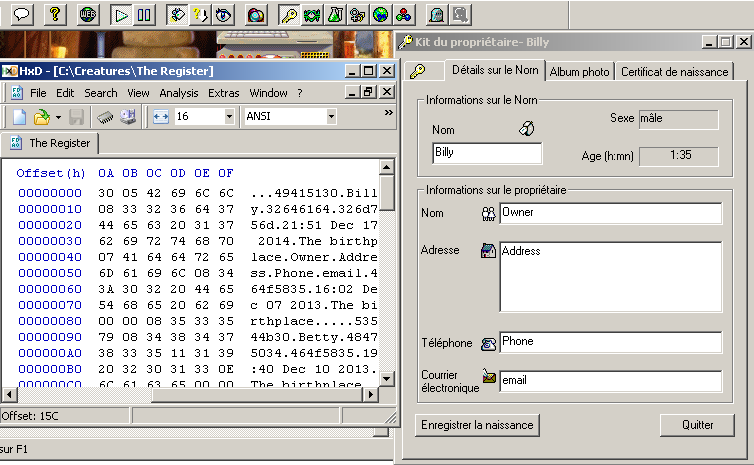
Parsing the Creatures 1 "TheRegister" file. (extracting Norn birthdates and owner information).

This will be a real quick article about parsing the Creatures1 "TheRegister" file.
This is like a primitive version of the C2 history files. It's the file that holds all creature information saved when you register a creature's birth.


They contain information about the Norn such as name, parents, date of birth and all owner info.

There's nothing really fancy about reversing and understanding the file format, so let's get this done.

Sunday, December 14, 2014

Extracting information from Creatures 1 PhotoAlbum files (And uncovering a 20 years old 2 pixel bug :)

In the last article, we've seen how to manually use the "dde: pict" CAOS command to take picture of our Norns the way the Owner's kit does it.

When doing it the usual way through the Owner's kit, all pictures are saved in individual photo album files for each Norn.
In this article I will show you all you need to know to extract all information from those file : timestamps, comments, and obviously, the picture data.


Saturday, November 29, 2014

Parsing Creatures 1 .spr files (Extracting/Manipulating any of the game's graphics)

In a previous article I showed how to read Creatures 2 .s16 files to extract any of the game image data.
In this obvious follow up I will show you how to read out Creatures 1.spr files for the same result.

The Creatures 1 .spr file format is only marginally harder to parse than the .s16 format.
This is because the .spr files do not directly contain color information for each pixel, but rather an index number, to be used as a lookup index inside an external palette file to get the actual color data.
 
Thankfully, Python magic can once again save us most of the hard work and makes extracting an manipulating C1 images files a breeze.


Thursday, February 6, 2014

Parsing Creatures 2 .S16 files (Extracting/Manipulating any of the game's graphics).

"Back then" few easy image manipulation libraries were available, making the extraction of game image data an intricate process (that most creature fans/developers tackled in an easy but not very user friendly way as we will expose).Nowadays things got easier.

In this post I will explain the creatures 2 .s16 file format, and show you how you can now very easily extract any picture from the game using python.
Not only that but we can also harness the power of modern image manipulation libraries to convert the game sprites to any file format we like contrary to most legacy tools only proposing to export images as BMP's and letting us do the conversion work manually.


Friday, January 24, 2014

Getting C2 chemicals descriptions (chemicals.def file format)

What a sneaky bastard I am.
This was supposed to be a C2 Norn autopsy article! (I swear I'm not doing that to avoid awarding anyone the promised carrot.)

I just realised something was still missing from the last article.
In the C1 chemicals information article we were able to pull out both chemical names and descriptions from the chemicals.txt file.

So where's that information in C2 ?