Showing posts with label tutorial. Show all posts

Wednesday, December 24, 2014

Parsing the Creatures 1 Graveyard file

 
One more victim of my file format reversing spree : the "The Graveyard" file containing all entries of C1 cemetery.


Parsing it will allow us to retrieve/edit/add all entries from this game file.

Tuesday, December 23, 2014

Understanding in game stores (Doctor's page and Aprodisiacs). aka "Health" and "Aphro" files.

There are two "stores" in Creatures 1, at least that's how I call them.

Those are the panels allowing you to inject additional items to the world through the Doctor's page and the aphrodisiacs page from the reproduction kit.

The C1 "Stores"

In this post I will show you reversing of those stores file formats, so we can replenish, parse, and edit them.

Sunday, December 21, 2014

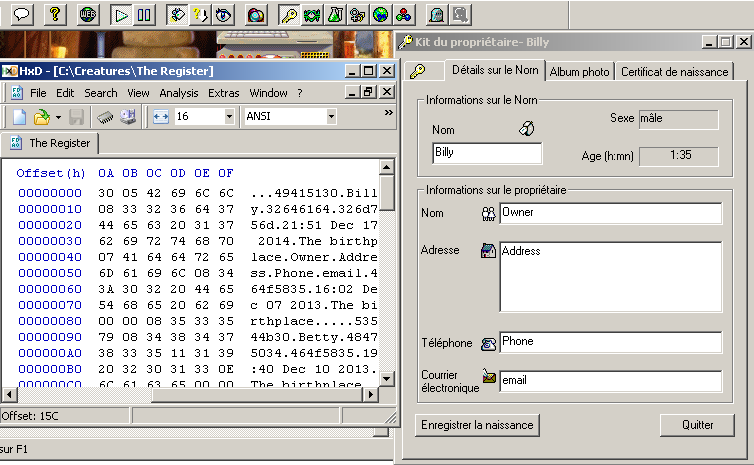
Parsing the Creatures 1 "TheRegister" file. (extracting Norn birthdates and owner information).

This will be a real quick article about parsing the Creatures1 "TheRegister" file.
This is like a primitive version of the C2 history files. It's the file that holds all creature information saved when you register a creature's birth.


They contain information about the Norn such as name, parents, date of birth and all owner info.

There's nothing really fancy about reversing and understanding the file format, so let's get this done.

Wednesday, December 17, 2014

Investigating Creatures 1 Teleporters

Alright, despite having loads of stuff in store, maybe I'll take a break from gory reversing stuff for this post, before I loose all of my readers (yeah, something like "both of them") :)

So why not take this opportunity to study something more generic? what about investigating how C1 teleporters work?


A happy Norn family, ready for exploration of time and space.


It only requires a bit of CAOS reading and your favorite C1 CAOS tool.

Sunday, November 30, 2014

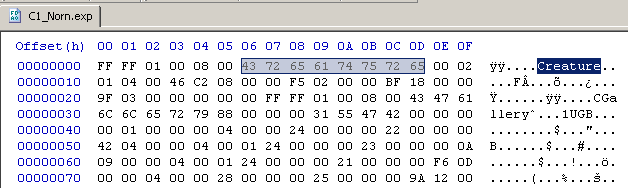
Reversing the C1 .exp file format part 1 (General layout and extracting the genome)

It's been all those years, and despite a lot of talented persons having contributed to making Creatures tools or documenting the game various features, there still isn't any available description of the .exp file formant anywhere as we're nearing 2015.


The .exp files are the format in which creatures are exported or imported from and to the game.

Obviously, they contain about anything one could need to know about a given Norn, and exploiting them for writing custom tools might allow for a lot of interesting options such as exporting a critically ill norn, performing offline surgery on the file, and reimporting it into the game.

This would allow curing a couple otherwise fatal issues since the ingame mechanics don't provide any means of removing a given chemical from a creature bloodstream or reinvigorating degraded C2 organs.
(See the case of C2 grendels being oversensitive to cyanide poisoning because they lack the chemical reaction genes that would allow them to lower their cyanide levels)

In this series of articles, I will describe the process of reverse engineering the C1 (and later C2) .exp file format so any programmer out there can use the information to implement .exp file manipulating programs.

The first articles of the series will show the process followed so more people can learn "how it's done" and maybe later take on reversing other undocumented game file formats.
Hopefully, if enough information can be gathered about the format, a final article will sum everything up into the cleanest and most complete description possible.

For this first article, we will analyse the general file layout, and learn how to extract a working genome file from an .exp file.

Let's dive into binary DNA !

Saturday, November 29, 2014

Parsing Creatures 1 .spr files (Extracting/Manipulating any of the game's graphics)

In a previous article I showed how to read Creatures 2 .s16 files to extract any of the game image data.
In this obvious follow up I will show you how to read out Creatures 1.spr files for the same result.

The Creatures 1 .spr file format is only marginally harder to parse than the .s16 format.
This is because the .spr files do not directly contain color information for each pixel, but rather an index number, to be used as a lookup index inside an external palette file to get the actual color data.
 
Thankfully, Python magic can once again save us most of the hard work and makes extracting an manipulating C1 images files a breeze.


Saturday, February 15, 2014

Connecting to the Creatures DDE interface from python

We've recently seen how easy it is to connect to the C1 and C2 DDE interfaces using VB.

This time we will show how easy it is to connect to those interfaces using python, which will prove useful in upcoming articles.


Connecting to a DDE server from inside python is can be a quick and easy process.
The hardest part is in acquiring the correct modules to do so, (which can be a real pain if you take it from the wrong side), there are also a couple specifics that make debugging the first DDE connections unreliable.
Fortunately I've sorted those perks out for you,and will show you the single quickest and easy way to connect to the Creatures 1 and 2 DDE interface from python.


Monday, February 3, 2014

Connecting to the Game: accessing the DDE interface with 3 lines of code. (Tutorial)


We've been studying a lot of stuff lately, most of it involving running CAOS commands against C1 and C2 games.
C3 has a convenient built-in CAOS console, and various third party tools also propose that feature for C1 and C2.

But how would you go about implementing this kind of connectivity inside your own programs?
The simplest way to connect to a running C1 or C2 game is through the DDE interface (Dynamic Data Exchange). Also it REALLY is simple even if you barely know anything about programming, so this might be worth checking out.If you never programmed anything and don't have any development tools handy, you could initiate a DDE connection even from inside an Excel macro using VBA.Also the C1 and C2 DDE interfaces being strictly identical, you'll be writing code only once, and be able to use it in both games right now, without any change.

By sending the game some basic CAOS commands and reading their results you can reproduce all of the game functionalities and then some more: reading a Norn's needs and chemicals levels in realtime, selecting Norns and Grendels, carrying them, monitoring their brains,etc...

This time I show you a very quick overview to get you started in pumping CAOS in and out the C1 and C2 games.More advanced use cases or details will come in futher posts.
 

Sunday, January 26, 2014

Finally, a Creatures 2 Norn autopsy tool


So, we've just learnt how to extract various information from C2 History files, among which a list of concentrations for a Norn's bloodstream chemicals at time of death.

We've also learnt how to map a chemical's number to a readable chemical name.

We can finally get to perform autopsies of dead C2 Norns!

Monday, January 20, 2014

Designing farting norns (Tutorial)


Many colored alternative breeds exist for all of the creatures games.

In this tutorial I will show you how to design a new breed for C1.
But not one that involves making new sprites for new colored or punk Norns, but rather one that implements new Norn behaviours and possibilities.
Using those techniques one could add loads of interesting behaviours to Norns such as :
  • Adding a kicking stance and associated behaviours to fight off Grendel more efficiently
  • Making Norns that can reinvigorate and heal by resorting to meditation
  • Enabling actual telekinesis in Norns ( yes, this IS possible with some work )
  • Making jumping Norns
  • Mimicking more realistic life behaviour ( digestion, elimination ... )
  • ...
But this time we will be:

Making Farting Norns:

Wednesday, January 8, 2014

Generating Creatures 2 Egg files with Python

The Creatures 2 .egg file format is one of the few well documented aspects of the game series.

Why bother writing about it on a blog about investigating undocumented game aspects then ?
Well, the ability to generate .eeg files is a pretty simple skill that might prove an interesting addition for anybody writing Creatures tools.

The aim here is just to show how quick and easy it is

Saturday, December 28, 2013

CAOS snippets

Learning the CAOS language can be a painful experience.

When you look for command usage examples when debugging your very first CAOS console application, there's not much you can find :
  • The "inst,dde: getb cnam,endm" every single kit, app or example uses as a demo ( it shows current creature's name )
  • Some "cheat codes" to kill creatures, give them full life... always the same ones, and never any further documentation of how they work.
  • Raw CAOS documentation, with very few information on actual syntax, importance of spaces, commas or variables...
Putting it all together can be a tricky process, especially since the early Creatures games are very sensitive to the slightest CAOS script mistake and will mercilessly crash the whole game for a single missing space.

Just so you don't tear your hair out on your early CAOS experiments, here is a list of snippets that do some basic stuff, that you can just copy and paste in your CAOS console or custom app, without wondering if you should use lowercase, uppercase, commas, spaces brackets exactly as in the documentation or not.