Showing posts with label documentation. Show all posts
Saturday, December 13, 2014
Repairing and understanding the lost "dde: pict" command (Taking photos of C1 Norns)
One promising nugget in the Creatures 1 CAOS reference, is the "dde: pict" command.
According to the documentation,
Unfortunately, as many other things this command not only lacks critical bits of explanation but is also inherently broken (at least considering the above definition) and when used produces less than stellar results:
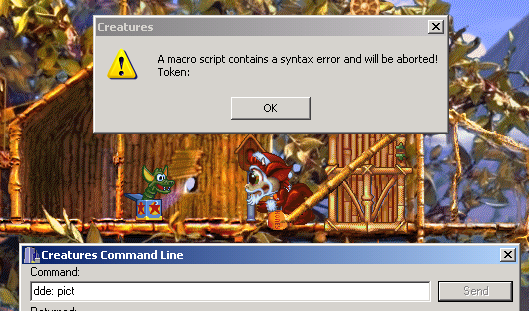
It's a shame we can't use this functionality in our own tools to take pictures as the Owner's kit does.
Or can't we ?
One of the main motives behind the site being uncovering such lost knowledge and abilities of the ancient Shee, come with me and find out how to understand and ultimately take advantage of this lost command.
Labels:
C1,
CAOS,
creatures,
Creatures 1,
dde: pict,
documentation,
example,
kit,
owner,
owner's kit,
parsing,
photoalbum,
pict,
reversing,
spr
Saturday, December 28, 2013
CAOS snippets
Learning the CAOS language can be a painful experience.
When you look for command usage examples when debugging your very first CAOS console application, there's not much you can find :
Just so you don't tear your hair out on your early CAOS experiments, here is a list of snippets that do some basic stuff, that you can just copy and paste in your CAOS console or custom app, without wondering if you should use lowercase, uppercase, commas, spaces brackets exactly as in the documentation or not.
When you look for command usage examples when debugging your very first CAOS console application, there's not much you can find :
- The "inst,dde: getb cnam,endm" every single kit, app or example uses as a demo ( it shows current creature's name )
- Some "cheat codes" to kill creatures, give them full life... always the same ones, and never any further documentation of how they work.
- Raw CAOS documentation, with very few information on actual syntax, importance of spaces, commas or variables...
Just so you don't tear your hair out on your early CAOS experiments, here is a list of snippets that do some basic stuff, that you can just copy and paste in your CAOS console or custom app, without wondering if you should use lowercase, uppercase, commas, spaces brackets exactly as in the documentation or not.
Thursday, December 26, 2013
Recovering the lost "sys: cmnd" documentation
One of the aspects of the CAOS specification I got exited about when I first saw it mentioned in the C1 CAOS guide was the "sys: cmnd" command.
Quoting from the manual :
This sounds awesome ! The ability from our external application (or COBs) to execute any existing game command!
This will greatly help us, allowing us to add pause/play buttons to our custom applications, to run existing applets, export and import Norns...
All right, let's head to the mentioned "resource file" and try this command !
Err...yes...the ummm...resource file... Which one ?
Well...none it seems...
Quoting from the manual :
SYS: menu commands
CMND id# - issue an ID_XXX command message to the application. This
allows macros to activate ANY menu command. Note that command
will get executed LATER - fn doesn't wait before returning!
id# is the decimal ID_XXX value - look these up in the resource
file & list them for users
This sounds awesome ! The ability from our external application (or COBs) to execute any existing game command!
This will greatly help us, allowing us to add pause/play buttons to our custom applications, to run existing applets, export and import Norns...
All right, let's head to the mentioned "resource file" and try this command !
Err...yes...the ummm...resource file... Which one ?
Well...none it seems...
Labels:
api,
C1,
cmnd,
Creatures 1,
dde,
documentation,
ID,
interface,
menu,
ole,
ressource file,
reversing,
sdk,
secret,
secrets,
sys: cmnd
Subscribe to:
Posts (Atom)